Dielectric: Electrical and acoustic spectroscopy via a PC sound card

This program generates a chirp signal, sweeping over a given frequency range, and drives a given audio output with the signal, while simultaneously analysing the signal coming from an audio input.  This allows electrical spectroscopy and acoustic spectroscopy from ~10Hz-100 kHz to be performed with a £40 sound card.  Note that AC97-channels (such as on-board sound) have lowpass filters built in, restricting the upper limit to around 25 kHz.  Tested with a Creative Audigy 2 ZS, using kX v5.1 drivers.

Download here.

test-120k-1k-fullrange

New hosting

Having looked around at many web hosting companies and cloud VPS providers, I eventually settled on Digital Ocean.  Besides being the cheapest by far, they also have no hidden charges (or at least none that I’ve come across), their website leaves you at most two-clicks away from any settings, and their support team are quite fast to respond, although not as fast as the friendly and very helpful community on the forums.

Having your own virtual private server means you can run whatever you want on your site: WordPress plus all the bells and whistles for no extra cost, with no restrictions on file types; a DNS server; an email server; a git repository – all for less than $0.01 per hour.  On the very remote chance that their service completely dies, losing all your data, you can have the important files on your server replicate to Skydrive, Dropbox, or to another VPS on another continent with a little extra effort.  This beats my last provider, heart internet, who wanted to add extra charges for pretty much everything.

A nice feature for analysis and data-mining: their virtual servers are billed per-hour.  This means that I can fire up a new 8-core/16GB virtual server in Amsterdam, leave a job running on it, collect the result a few hours later and destroy the sever – for the grand cost of one US dollar.  Nice.
Segment timer: Improve your multitasking with Segtimer

I often used to get “sucked into” debugging and diagnostic projects.  This little utility helps to prevent that – it is basically an alarm clock that hides in the system tray and goes off at preset intervals with a choice of notifications (annoying noise, popup message, flash scroll-lock LED).

Download from here.

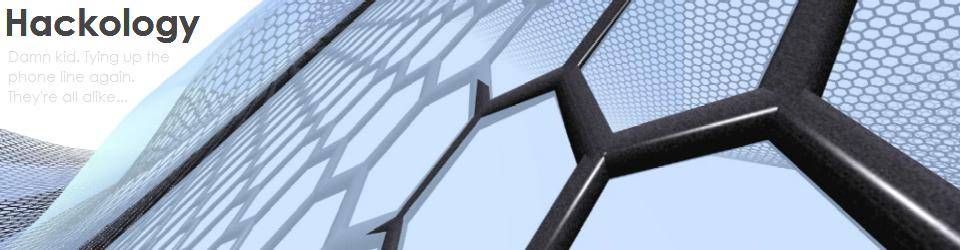
Segtimer-configure

Upon launch, this program will ask for some parameters:

  • The time interval which to alert you at
  • How to alert you:
    1. Flash the scroll-lock LED on your keyboard
    2. Beep at you
    3. Show a popup message

After setting the parameters and clicking OK, Segtimer will hide in your notification area (the “tray”). The tray icon has several actions:

  • Left mouse button double-click: Reset timer
  • Middle mouse button click: Edit parameters
  • Right mouse button double-click: Close Segtimer

To launch Segtimer with preset parameters (e.g. from your Startup folder), use the following syntax:

SEGTIMER [F|B|P]

For example, to alert at 40-minute intervals with [F]lashing scroll-lock, [B]eep but no [P]opup, call:

SEGTIMER 40 FB